Checklist · Everyday IT

Can you restore your backups?

A backup only counts if you can bring it back. Answer these honestly, and fix any "no".
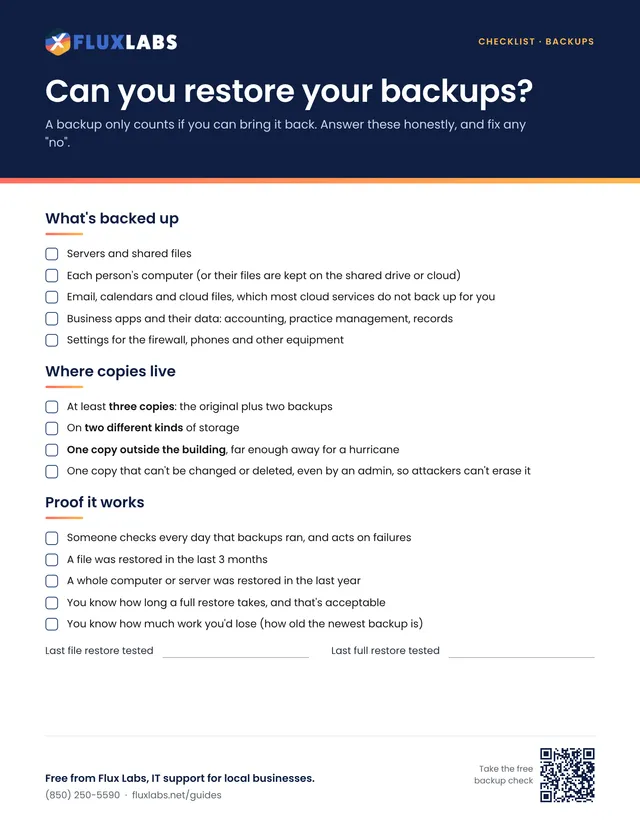
First page of the Can you restore your backups? checklist

Free to print and share

One page, US Letter, in color. Tick the boxes and type on the lines right in your browser or PDF reader, then save or print it.

We'll send the link, plus an occasional IT tip. Unsubscribe anytime.

Filling in online works in Chrome, Edge, Safari and Adobe Reader. Your answers stay on your computer.

Want all 34? Get the whole pack by email or browse the library.

What's inside

The full text

What's backed up

  • Servers and shared files
  • Each person's computer (or their files are kept on the shared drive or cloud)
  • Email, calendars and cloud files, which most cloud services do not back up for you
  • Business apps and their data: accounting, practice management, records
  • Settings for the firewall, phones and other equipment

Where copies live

  • At least three copies: the original plus two backups
  • On two different kinds of storage
  • One copy outside the building, far enough away for a hurricane
  • One copy that can't be changed or deleted, even by an admin, so attackers can't erase it

Proof it works

  • Someone checks every day that backups ran, and acts on failures
  • A file was restored in the last 3 months
  • A whole computer or server was restored in the last year
  • You know how long a full restore takes, and that's acceptable
  • You know how much work you'd lose (how old the newest backup is)
Last file restore tested
Last full restore tested

Everyday IT

More printables like this

Questions about anything in here?

Our team helps local businesses with exactly this every day. A 15-minute call is free.
Book a call

Book a 15-minute call

A quick call about your business, your setup and what isn't working. If we're not the right fit, we'll say so.

Pick a day

Times shown in Central Time

Loading open times…