
Free Windows app
Is your data safe if this laptop walks away?
Check in seconds whether every drive on a Windows PC is encrypted, and get a one-page report to prove it.
Free · Windows 10 and 11 · No sign-up
Why it matters
A lost laptop is either a hassle or a data breach
If a laptop's drive isn't encrypted, anyone who finds it can read everything on it: client files, saved passwords, email. With BitLocker on, the drive is useless without its recovery key.
Most owners assume it's on. This app tells you for sure.
What it does
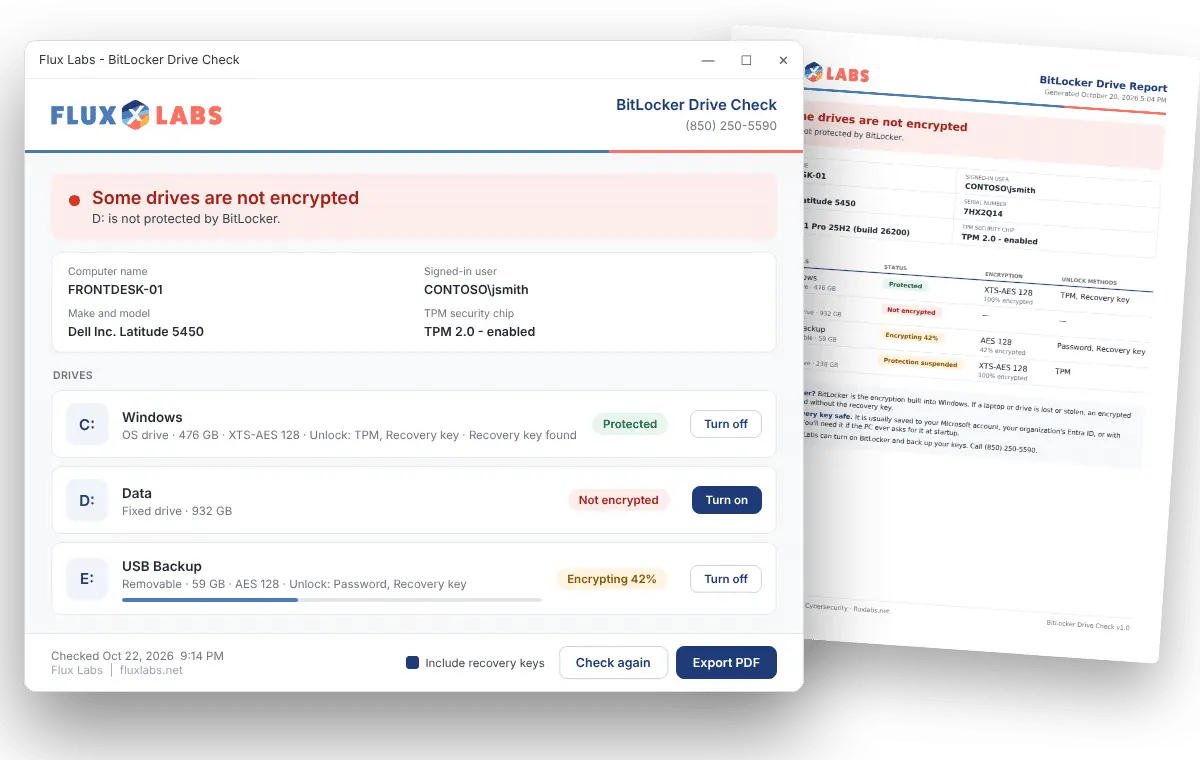
Everything about a PC's encryption on one screen
Each drive shows as protected, not encrypted, encrypting or paused, in plain green, amber and red.
Export a PDF with the computer name, serial number and every drive's status, for audits, cyber insurance or your own records. Recovery keys can be included if you want them.
The app makes a new recovery key and won't start encrypting until you've saved it. You can also resume protection after a Windows update with one click.
How it works
Three steps, about a minute
Download the app. There's nothing to install and nothing to sign up for.
Double-click it and choose Yes when Windows asks for permission. Only administrators can read BitLocker status.
Click Export PDF, then print it or file it with your records.
Version 1.1 · Windows 10 and 11 Pro, Business, Enterprise or Education · About 2 MB · Signed by Flux Labs, and nothing leaves your computer.
Windows Home doesn't include full BitLocker. The app will tell you if that's the case.
Common questions
Is it really free?
Yes. No sign-up, no trial, no catch. Checking encryption shouldn’t take an IT visit, so we made it something anyone can do.
Does it change anything on my computer?
Not unless you click Turn on, Turn off or Resume. Checking drives and exporting a report don’t change anything.
Does it send my information to Flux Labs?
No. Everything stays on your computer. The report is saved wherever you choose and nowhere else.
Why does Windows ask for permission when I open it?
Windows only lets administrators read BitLocker status and recovery keys. The prompt shows Flux Labs as the verified publisher, so you know it came from us.
What happens if I lose my recovery key?
If a PC ever asks for its recovery key at startup and you don’t have it, the data on that drive can’t be recovered, by anyone. That’s why the app makes you save a new key before it encrypts anything, and why we back up keys for every computer we manage.
Does it work on a Mac?
No, it’s Windows only. Macs use FileVault instead of BitLocker, and we’re happy to check those for you.
Can you check every computer in our office?
Yes. For more than a few computers, we can check them all at once and send you a single report. Contact us to get started.
For businesses
Want every computer in your office checked?
We'll check every PC at once, turn on encryption where it's missing and keep the recovery keys backed up for you.