Looking for the Windows 11 fall update features that actually help at work? Highlights include Copilot, smarter built-in apps, easier PC moves, a faster and safer Edge with more secure network data, energy-saving presence features, deeper personalization, and a few handy extras.
Microsoft keeps moving Windows forward. The latest Windows 11 fall update aims to be “the most personal Windows 11 experience,” with upgrades that save time and reduce hassle for everyday work—great for offices around Panama City.
Windows 11 Fall Update Features at a Glance
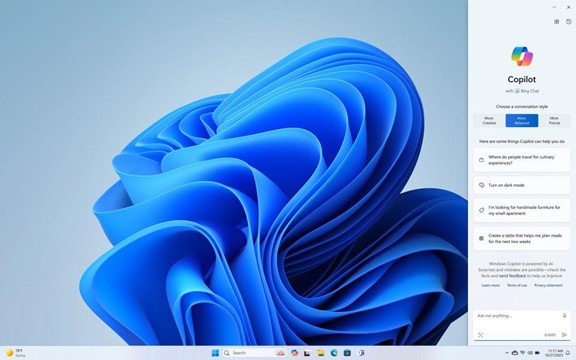
Copilot: Your Built-In Helper for Everyday Tasks
Copilot is now built into Windows 11 as an AI assistant. Ask it to summarize a web page, switch your PC to dark mode if you forget where to click, or generate a quick custom image for a post. Copilot offers real-time suggestions and turns your requests into results with simple prompts.
Built-In Apps Get Smarter: Paint, Snipping Tool, Clipchamp and More
The Snipping Tool now does more than simple screenshots. Several apps pick up AI help in this release, including Paint, Clipchamp, and Photos.
Paint’s Cocreator can generate a unique image from your text prompt and style, then let you refine it right inside Paint. Clipchamp, one of the simplest video editors around, can pull in your clips and assets and have the AI draft a video for you.
Clipchamp’s Auto Compose can:
- Recommend scenes
- Make edits
- Create a narrative from your inputs
Move to a New PC Faster with Windows Backup
Buying a new computer shouldn’t mean losing a day to transfers. Windows Backup now makes moving between devices easier. Choose what to back up, including folders and app settings, then restore the new PC from your backed-up PC with a guided process that helps you avoid missing anything important.
Edge Is Faster and Safer
Microsoft Edge gets speed and security improvements. The Edge Secure Network now offers more data—up from 1GB to 5GB—and encrypts your connection to protect information in transit. It shares many traits with a VPN, which can add a layer of protection for organizations looking to reduce the risk from phishing link clicks.
Save Energy and Battery Power
Adaptive Dimming uses your PC’s sensors to gently dim the screen when you’re not paying attention. That helps save power and can nudge you to refocus. These presence-aware features depend on device sensors, so you’ll see them more often on newer machines.
Two related sensor-based features are:
- Wake on Approach
- Lock on Leave
Make Windows Feel More Like Yours
Windows 11 becomes more personal with options that match how you work. You’ll see:
- Personalized themes
- Custom widgets
- Intelligent assistants
Together, these make daily interactions feel more tailored and intuitive.
More Handy Additions to Try
- Copilot in Microsoft Shopping: Get tailored product recommendations in Bing to find what you need faster.
- Content Credentials: Add an invisible digital watermark to AI-generated images in Bing using cryptographic tagging.
- Bing Chat Enterprise updates: Spark new ideas and use multimodal visual search—find information using images alone.
- DALL.E 3 model from OpenAI: Image Creator in Bing now uses DALL.E 3 to render images from your text prompts.
Make the Most of Microsoft at Work
Microsoft has long led the way in productivity tools. If your team is still working the 2020 way, we can help you modernize with Microsoft 365, Windows 11, and related solutions so your people can get more done with less friction.
Want help planning or rolling out these updates for your business? Let’s talk. You can get in touch with Flux Labs anytime.