Checklist · Scams and email

I clicked a link. Now what?

Act fast and tell IT right away. You are not in trouble: the first 15 minutes matter more than anything else.
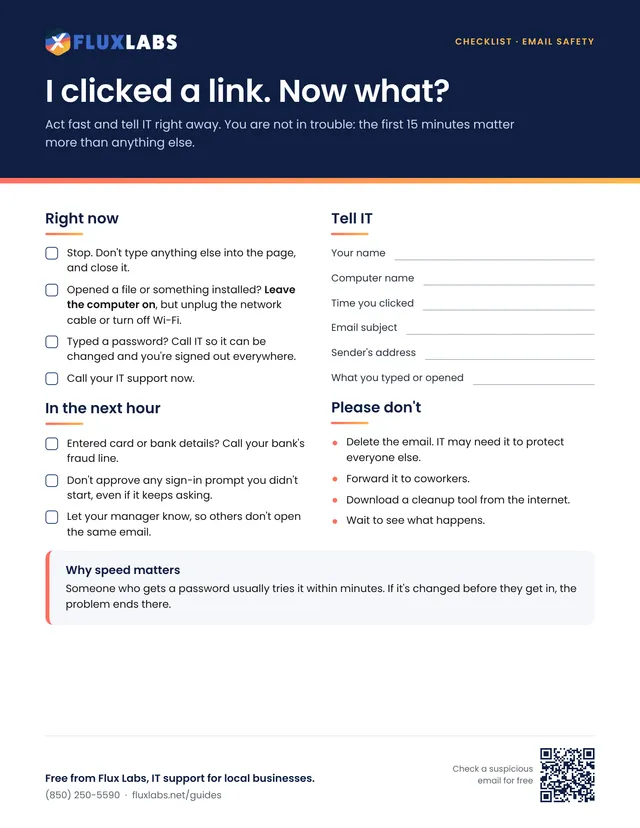
First page of the I clicked a link. Now what? checklist

Free to print and share

One page, US Letter, in color. Tick the boxes and type on the lines right in your browser or PDF reader, then save or print it.

We'll send the link, plus an occasional IT tip. Unsubscribe anytime.

Filling in online works in Chrome, Edge, Safari and Adobe Reader. Your answers stay on your computer.

Want all 34? Get the whole pack by email or browse the library.

What's inside

The full text

Right now

  • Stop. Don't type anything else into the page, and close it.
  • Opened a file or something installed? Leave the computer on, but unplug the network cable or turn off Wi-Fi.
  • Typed a password? Call IT so it can be changed and you're signed out everywhere.
  • Call your IT support now.

In the next hour

  • Entered card or bank details? Call your bank's fraud line.
  • Don't approve any sign-in prompt you didn't start, even if it keeps asking.
  • Let your manager know, so others don't open the same email.

Tell IT

Your name
Computer name
Time you clicked
Email subject
Sender's address
What you typed or opened

Please don't

  • Delete the email. IT may need it to protect everyone else.
  • Forward it to coworkers.
  • Download a cleanup tool from the internet.
  • Wait to see what happens.

Why speed matters

Someone who gets a password usually tries it within minutes. If it's changed before they get in, the problem ends there.

Scams and email

More printables like this

Questions about anything in here?

Our team helps local businesses with exactly this every day. A 15-minute call is free.
Book a call

Book a 15-minute call

A quick call about your business, your setup and what isn't working. If we're not the right fit, we'll say so.

Pick a day

Times shown in Central Time

Loading open times…