
Microsoft Viva Goals helps you set clear company targets, connect them to team work, and track progress right inside Microsoft Teams—so everyone rows in the same direction.
You hear “digital transformation” and “collaboration” a lot. But what does that look like when you’re running an office in Bay County?
Collaboration only works when people share the same goals. If departments are siloed, priorities can clash. Folks work hard, but not always together.
Digital transformation is using technology to hit business targets faster. It means moving past paper and manual steps. It means tools that connect, automate, and surface useful insights.
Microsoft has leaned into this with its Viva platform. It’s built to improve the employee experience with AI, automation, and cloud services. In this guide, we’ll give a quick overview of Viva, then focus on Viva Goals and how it can help your company stay aligned.
A Quick Look at Microsoft Viva
Microsoft Viva is a collection of employee experience apps that plug into Microsoft 365, especially Microsoft Teams. Think of them as add-ons that extend what your workplace can do.
There are seven Viva apps today, each with a different focus:
- Viva Topics: Surfaces company knowledge by turning keywords into helpful topic pages pulled from your content.
- Viva Connections: Delivers a tailored company feed with news, conversations, and quick access to tools.
- Viva Learning: Brings training content into Teams so employees can build skills without leaving their flow of work.
- Viva Insights: Uses data to suggest ways to improve productivity and well‑being.
- Viva Sales: Cuts down on manual entry for sellers and suggests next best actions with customers.
- Viva Engage: Builds community and personal networks to encourage sharing and connection.
- Viva Goals: Helps set, align, and track company objectives.
Taken together, Viva goes beyond traditional “office software.” It connects Microsoft 365 apps and centers on people and outcomes. The apps use AI to simplify work and make progress visible.
What Microsoft Viva Goals Does
Viva Goals is one of the newer Viva apps. It connects teams around shared objectives, no matter their department. Leaders can define company goals, then link them to measurable targets for each group.
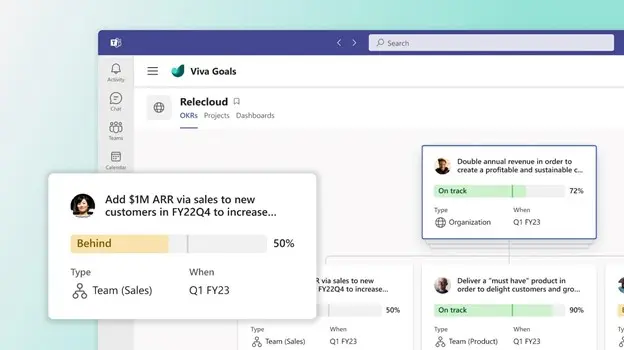
Here’s a simple example. Let’s say your top‑level aim is “deliver exceptional customer support.” That’s a good direction, but it’s broad. In Viva Goals, you can tie that objective to clear targets by team—like asking customer support to cut average ticket resolution time by 8 hours. Now the goal is specific and trackable.
Get Everyone Pulling in the Same Direction
Viva Goals turns company priorities into concrete targets. Teams and individuals can see what success looks like. Daily work maps back to business objectives, so departments aren’t chasing different outcomes. That alignment makes it easier to hit your numbers.
Keep Goals Visible in Daily Work
Viva connects with Microsoft 365, making it simpler to gather and share progress. Leaders get a clearer view of how things are going. Employees see how their tasks move the needle, which helps them stay focused. Goals don’t get announced once and forgotten—they’re part of the workflow.
Built Into Teams and Microsoft 365
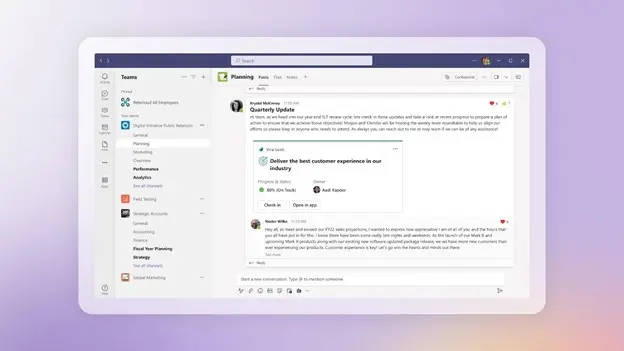
Because Viva Goals lives in Teams, targets stay front and center. You can highlight wins when people or groups reach key milestones. Progress isn’t buried in a spreadsheet somewhere—it’s right where your staff already works. Visibility keeps everyone engaged and moving together.
How to Get Viva Goals
Viva Goals is available as an add‑on for Microsoft 365 and is also included when you license the full Viva suite. If you’re unsure which option fits your organization, we can help you review what you have today and what you need next.
Questions About Microsoft 365 or Viva Goals?
Modern tools like Microsoft Viva help businesses in and around Panama City work smarter with AI, automation, and the cloud. If you want guidance on setup or adoption, we’re here to help.
Want to align your team and keep goals on track? Let’s talk about what makes sense for your business—please get in touch.