
Copilot for Microsoft 365 helps small businesses write content, automate routine work, improve team communication, and speed up onboarding—and it’s now available to companies on Microsoft 365 Business Standard or Business Premium as an add-on. Here’s what it can do and how to start.
Small businesses grow when work moves faster and smarter. Microsoft has opened up Copilot for Microsoft 365 to smaller companies too. It was enterprise-only at first. Now any business on Microsoft 365 Business Standard or Business Premium can add it.
Copilot is built into the apps your team already uses. It can draft, summarize, and suggest next steps. That means fewer manual tasks and more time for serving customers here in Bay County.
How Copilot for Microsoft 365 Speeds Up Everyday Work
Copilot uses advanced AI trained on large amounts of text to understand plain language and respond in context. Inside Microsoft 365, it turns short prompts into useful suggestions, drafts, and next actions.
Here are practical ways that turns into results for a small business:
Create Content In Less Time
Staring at a blank screen? Copilot can propose replies, finish sentences, and even draft full emails from a short prompt. With a few instructions, your team can:
- Produce stronger marketing copy
- Write quick, clear customer service emails
- Build engaging PowerPoint slides and speaker notes
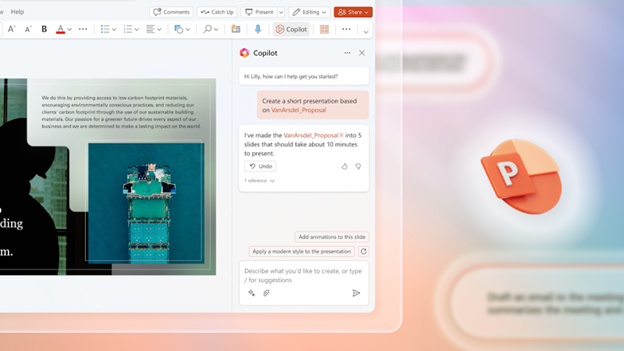
Automate Routine Tasks And Boost Productivity
Copilot helps trim time-consuming busywork by suggesting next steps and handling repetitive tasks. Think auto-generating reports, summarizing long threads, or moving data into the right place. That frees your staff to focus on strategic projects and core work.
Communicate More Clearly As A Team
Clear writing keeps projects moving. Copilot can suggest better phrasing, fix grammar, and keep your tone consistent across apps. The result is smoother collaboration, faster reviews, and better client updates.
Shorten The Learning Curve
Because Copilot works inside familiar Microsoft 365 apps, it guides people as they work. New hires get up to speed faster and can contribute sooner, without digging through training docs.
Ways Different Teams Can Use Copilot
- Marketing and sales: Draft social posts, tailor outreach emails, and shape presentations with on-the-spot writing suggestions.
- Customer service: Compose clear, consistent replies and resolve tickets faster with suggested responses.
- Project management: Outline plans, generate progress updates from a short prompt, and keep everyone aligned.
- Content creators: Beat writer’s block, brainstorm angles, and maintain a steady flow of quality copy.
- Finance and accounting: Cut manual data entry, get quicker summaries, and prompt Copilot to assemble clearer reports.
Getting Started With Copilot In Your Business
- Check your plan: Copilot is available with Microsoft 365 Business Standard or Business Premium.
- Turn it on: Buy the Copilot add-on for your subscription, then work with your IT support team to enable it in the Microsoft 365 apps you use.
- Try it out: Explore Copilot’s prompts and suggestions in your day-to-day work to see where it saves the most time.
- Offer short training: It’s simple to use, but quick refreshers help everyone understand what to ask for and how to review results effectively.
Make More Of Microsoft 365
Copilot for Microsoft 365 isn’t just another feature—it’s a practical way to help a small team do more with the tools they already have. Embrace it, and you can streamline work and give your staff more time for what matters.
Want help rolling out Copilot and sharpening your Microsoft 365 setup? Flux Labs is here to help—get in touch.