
Want a simple way to teach your team how to spot phishing emails? Use SLAM: check the Sender, Links, Attachments, and Message before you trust or click.
Phishing sits at the center of most cyberattacks. It’s the starting point for ransomware, stolen passwords, and data leaks. The reason it stays on top is simple: it still works. Criminals keep changing their tactics and now even use AI to make messages feel personal and urgent.
When people stop paying attention, clicks happen. In May 2021, phishing attacks increased by 281%. Then in June, they spiked another 284% higher. And training fades over time—research shows that about six months after a class, many employees slip back into old habits.
How to Spot Phishing Emails: Use SLAM
SLAM is an easy memory aid that helps people slow down and check the right things before they click. It stands for:
- Sender
- Links
- Attachments
- Message
Teach your team to run this quick checklist on anything that feels off. It’s a fast habit that can stop a bad click—useful for offices around Panama City and anywhere else.
S: Verify Who Sent It
Look closely at the From address, not just the display name or logo. Scammers often spoof a sender or register a domain that looks almost right at a glance.
Here’s an example that pretends to be from Bank of America. Notice how the domain buries the brand inside a longer address to appear trustworthy at first look.
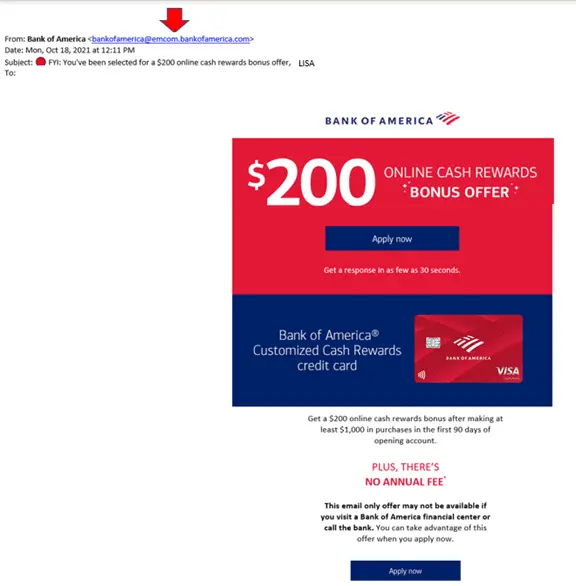
The message looks polished, which is why many people fall for it and hand over sensitive details. A quick web search of the sender address can reveal warnings from others who’ve seen the same scam.
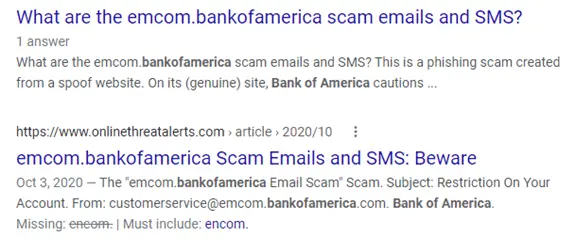
Take ten seconds to paste the email address into Google. If it’s linked to known scams, you’ll often see alerts right away.
L: Check Links Before You Click
Links are a favorite trick because many security tools focus on blocking dangerous file attachments. A link itself may look harmless, but it can lead to a site that tries to steal logins or run fake forms.
On a computer, hover over buttons, images, and linked words to see the real URL without opening it. If the address looks odd, misspelled, or unrelated to the sender, don’t click.
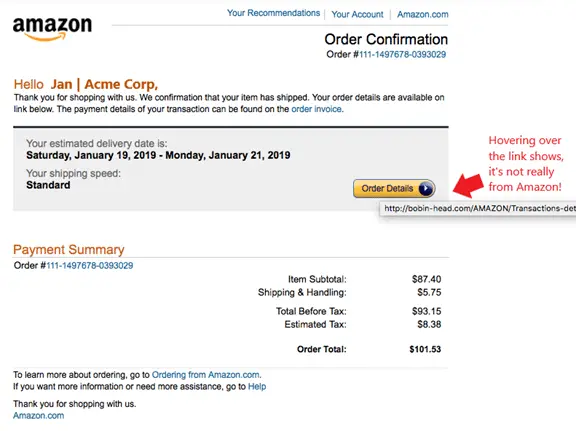
On a phone or tablet, it’s harder to preview links. When in doubt, don’t tap. Instead, go directly to the company’s website in your browser or app and check for the same notice there.
A: Treat Attachments as Risky by Default
Attachments are still a common way to deliver malware. Today, almost any file type can be weaponized—even PDFs. If you weren’t expecting a file, assume it’s unsafe until proven otherwise.
- Don’t open unexpected or strange attachments.
- Scan all attachments with your antivirus/anti-malware tool first.
- Confirm with the sender through a known channel if you’re unsure.
M: Slow Down and Read the Message
It’s easy to skim and miss small signs. Many phishing emails include subtle grammar errors, odd phrasing, or urgent demands that try to rush you.
In the example shown earlier under Links, the text says, “We confirmation that your item has shipped,” instead of “We confirm that your item has shipped.” Little mistakes like this are red flags.
Stronger Email Security for Your Team
Good habits plus the right tools make a big difference. Regular awareness training and layered security can raise your defenses against phishing and the attacks it starts.
If you’d like help improving email security for your business, get in touch. We support small and mid-sized teams across Bay County.


