
Before you recycle a mobile phone number, update it on your accounts, two-step logins, and any services that text you—and let your contacts know—so the next owner can’t get into your stuff.
People change numbers all the time. Maybe you moved and want a local number, or your company is reassigning a line to a new employee. That’s normal. What causes trouble is leaving your old number tied to your logins, text alerts, and password resets.
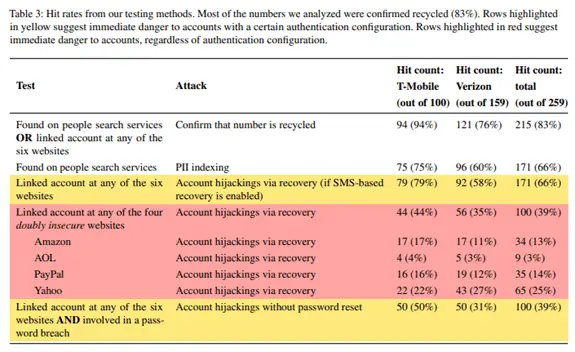
If you skip this cleanup, you can open the door to identity theft, credit card fraud, and account takeovers. A Princeton University study found that 66% of numbers marked as “available” by major carriers were still linked to accounts on big-name sites like Amazon and PayPal. In other words, a brand-new owner could receive texts meant for the previous owner and use them to get into their accounts (study).
Below is a quick checklist you can use at home or at the office here in Bay County to make this change safely.
Before You Recycle a Mobile Phone Number: A Checklist
- Update your online accounts and cloud apps. Most of us manage far more logins than we realize—the average person juggles about 100 passwords. Many sites text password resets or alerts to your number. Change the number in your account settings so any security texts reach you, not the next owner.
- Fix social media right away. If a Facebook, Instagram, or LinkedIn account gets hijacked, crooks often message your contacts to trick them. Update the number on each profile. If you use WhatsApp, it’s tied directly to your number—follow WhatsApp’s steps for changing your number so your chats and backups stay secure.
- Tell businesses that call or text you. Many companies now use text instead of email for shipping notices, payment confirmations, sales, and appointment reminders. Contact any service that reaches you by SMS or phone and update your details. Common ones include:
- Dentist or doctor’s office
- Pharmacy
- Utility company
- Plumbing or HVAC company
- Local retailers
- Check two-step login codes. Two-step login (multi-factor authentication, or MFA) protects accounts even if someone knows your password. But if codes still go to your old number, a stranger could sign in and lock you out. As you update each account, confirm the code method now points to your new number.
- Scan your text history for stragglers. Scroll through old messages to spot senders you forgot—seasonal vendors, one-time deliveries, or a service you use just once a year. Update those too.
- Notify friends, family, and coworkers. Send a quick “new number” text from the new line and ask them to update your contact. It also helps to have them delete old threads with your previous number, so they don’t reply to the wrong one in a hurry—especially in group texts.
Is Your Mobile Device Secure Enough?
Phones and tablets are frequent targets for malware and phishing. If a number change is coming up, it’s a great time to review mobile security across your team’s devices and make sure protections are in place.
Need help cleaning this up for your team around Panama City or want a quick mobile security check? Let’s talk—get in touch.


