Checklist · Security habits

Traveling with a work laptop

Airports, hotels and coffee shops are where laptops get lost, stolen or snooped on.
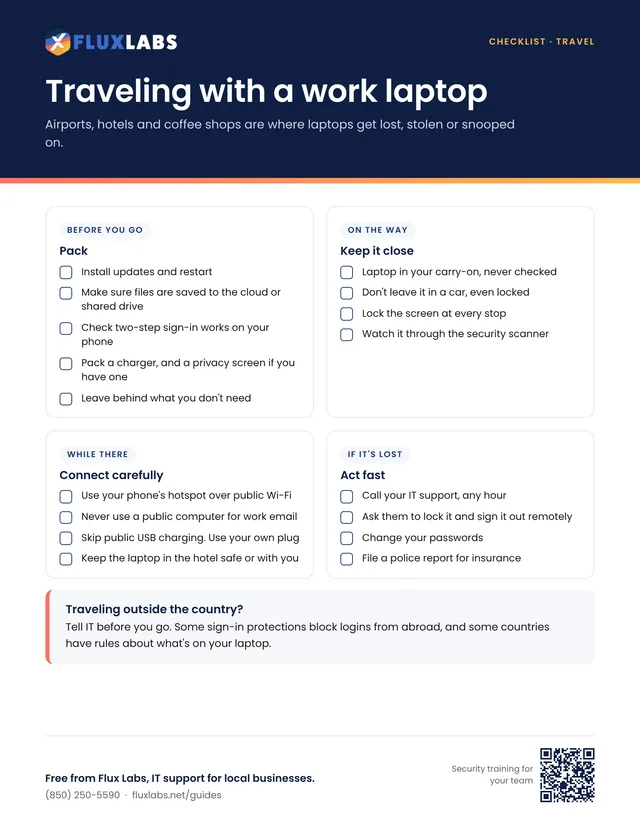
First page of the Traveling with a work laptop checklist

Free to print and share

One page, US Letter, in color. Tick the boxes and type on the lines right in your browser or PDF reader, then save or print it.

We'll send the link, plus an occasional IT tip. Unsubscribe anytime.

Filling in online works in Chrome, Edge, Safari and Adobe Reader. Your answers stay on your computer.

Want all 34? Get the whole pack by email or browse the library.

What's inside

The full text

Before you go

Pack

  • Install updates and restart
  • Make sure files are saved to the cloud or shared drive
  • Check two-step sign-in works on your phone
  • Pack a charger, and a privacy screen if you have one
  • Leave behind what you don't need
On the way

Keep it close

  • Laptop in your carry-on, never checked
  • Don't leave it in a car, even locked
  • Lock the screen at every stop
  • Watch it through the security scanner
While there

Connect carefully

  • Use your phone's hotspot over public Wi-Fi
  • Never use a public computer for work email
  • Skip public USB charging. Use your own plug
  • Keep the laptop in the hotel safe or with you
If it's lost

Act fast

  • Call your IT support, any hour
  • Ask them to lock it and sign it out remotely
  • Change your passwords
  • File a police report for insurance

Traveling outside the country?

Tell IT before you go. Some sign-in protections block logins from abroad, and some countries have rules about what's on your laptop.

Security habits

More printables like this

Questions about anything in here?

Our team helps local businesses with exactly this every day. A 15-minute call is free.
Book a call

Book a 15-minute call

A quick call about your business, your setup and what isn't working. If we're not the right fit, we'll say so.

Pick a day

Times shown in Central Time

Loading open times…