Wondering what’s new in iOS 17? Expect easier sharing, smarter typing, voicemail transcripts, upgraded FaceTime and Messages, a new StandBy screen, and added health tools—useful touches for everyday work and life.
Apple’s next major iPhone software release adds convenience across calling, messaging, and sharing. You’ll also see improvements to on‑device typing and voice dictation, plus a new glanceable screen when your phone is charging. Apple’s preview highlights these updates in detail (iOS 17).
What’s New in iOS 17
The update focuses on practical upgrades you’ll notice right away—especially in Messages, FaceTime, and sharing between phones. It’s designed to feel more natural and seamless for day‑to‑day use (source).
Read Voicemail As It Happens
When a call rolls to voicemail—say you’re in a meeting—you can view a live transcript on your screen to judge if it needs immediate attention. No guessing or dialing in first (source).
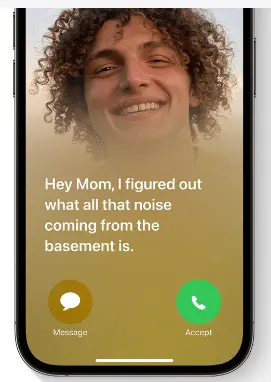
Set How You Appear When You Call
Create a personalized Contact Poster so people see the photo, Memoji, colors, and text style you choose when you call them. You control the look you share (source).
Leave FaceTime Messages
If someone can’t answer, you can leave a video or audio message in FaceTime—perfect for sharing a quick visual update they can watch later (source).
FaceTime Reactions and Apple TV Support
FaceTime adds expressive reactions you can trigger during a call, including:
- Hearts
- Balloons
- Fireworks
- Laser beams
- Rain
- and more
You can also place FaceTime calls on Apple TV to see people on the big screen (source).
Stickers Get a Big Upgrade in Messages
Messages adds new emoji stickers and the option to turn photo subjects into Live Stickers. You can apply effects and keep everything organized in a dedicated sticker drawer (source).
Share Faster with AirDrop and NameDrop
Move photos, videos, and files to another device in seconds with improved AirDrop. NameDrop lets you share your contact details just by bringing two iPhones together—it also works between an iPhone and Apple Watch. You can even share your Contact Poster and share music this way too (source).
Typing and Dictation Get Smarter
Autocorrect uses a more advanced language model to better predict what you mean to type. Dictation accuracy improves as well, thanks to an updated speech recognition model (source).
StandBy: Big, Glanceable Info While Charging
When your iPhone is charging—on a desk or across the room—StandBy turns the screen into a simple, useful display. Personalize it with:
- Clock styles
- Favorite photos
- Widgets (including Smart Stacks)
- Live Activities
- Siri
- Incoming Calls
It’s built for quick glances, so you can see what matters without picking up your phone (source).

Mental Health and Screen Distance
The Health app adds tools to log daily moods and momentary emotions, plus easy access to depression and anxiety assessments used in clinics. Screen Distance in Screen Time helps reduce digital eyestrain by prompting you to hold the device farther away if it’s been within 12 inches for a while (source).
Need Help With iPhone Features or Security?
iOS 17 brings a lot of thoughtful updates. If you’d like quick tips for your team’s iPhones or want to tighten mobile security for your office around Panama City, get in touch. We’re glad to help.