Microsoft Designer for business is an easy design app with AI help, ready-made templates, and team sharing—useful for fast, on-brand graphics across your Microsoft 365 workflow.
Microsoft keeps adding helpful tools to its business stack. Microsoft 365 started with about seven apps, and today new users get access to 20+ tools. One of the newest is Microsoft Designer, built to help anyone make clean, professional graphics fast—no design degree required.
A Clean Workspace Anyone Can Use
Microsoft Designer keeps the screen tidy, so you can focus on what you’re making. It’s built for beginners and pros alike, with simple controls and AI to help you get started.
- Drag-and-drop editing
- Right-click/contextual menus
- Straightforward navigation
- Text prompts to kick off a design
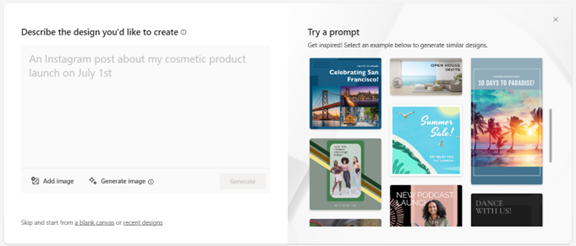
The first thing it asks is: “Describe the design you’d like to create.” Type what you have in mind and it can generate options for you—or you can upload your own images and continue from there.
Templates and Built-In Assets to Jump-Start Your Draft
Designer includes a large collection of ready-made templates, so you can move quickly whether you’re creating a social post, flyer, or business card. It also bundles brand-friendly building blocks like:
- High-quality images
- Icons
- Fonts
- Color palettes
Mix and match these to keep your look consistent and on brand.
AI Suggestions That Nudge You in the Right Direction
Designer acts like a lightweight assistant. It uses AI to analyze your layout and recommend improvements—such as font pairings, image placement, and other adjustments—so your finished piece looks intentional, not rushed. It’s especially handy if design isn’t your day job.
Work Together and Stay in the Microsoft Flow
Teamwork matters. Designer supports sharing, real-time feedback, and edits, so multiple people can work on the same project. It also connects smoothly with familiar Microsoft apps like PowerPoint and Word, which helps keep your content and visuals aligned without jumping between unrelated tools.
Use It Anywhere
You can run Microsoft Designer in a web browser or as a desktop app on both Windows and Mac. It also works well when you’re away from your desk on a mobile device. Microsoft builds to accessibility standards, so people with different needs can use it.
What Microsoft Designer for Business Includes
If you’re running a small team around Panama City, this is a practical way to produce sharp, branded visuals without a lot of back-and-forth. Here’s a quick look at how the AI prompt feature behaves.
What Can the AI Generate?
We tried the prompt: “a sales ad for orange juice with palm trees.” In a few seconds, Designer produced several variations to choose from.
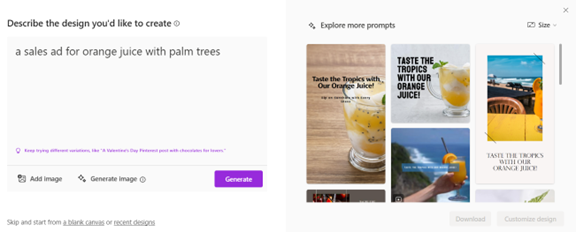
Some results may miss the mark, but many will be close. If you’re not seeing what you want, tweak your wording and try again.
Need Help Getting More from Microsoft 365?
Microsoft 365 is a big toolbox that can cut costs and increase productivity—from the Office apps to Intune for managing your company’s computers and devices. If you’d like help with setup, security, or day-to-day questions, we’re here to support you.
Frequently asked questions
Do I need design experience to use Microsoft Designer?
No. It’s built for non-designers with prompts, templates, and AI suggestions that guide you through a clean, simple interface.
Can my team collaborate on the same project?
Yes. You can share designs, collect real-time feedback, and make edits together. It also ties in well with PowerPoint and Word for a smooth workflow.
Does Microsoft Designer work on both Windows and Mac?
Yes. You can use it on the web or as a desktop app on Windows and Mac, and it works from mobile devices too.
What if the AI results aren’t quite right?
Refine your prompt. Changing or adding details usually leads to better options on the next pass.
Want help rolling tools like Designer into your daily work? Let’s talk—get in touch.