Microsoft Forms for business makes it simple to create surveys, quizzes, and sign-up pages, share them with a link, and see results instantly—and it’s already included with most Microsoft 365 plans.
Microsoft 365 is everywhere—there are roughly 345 million paid subscriptions in use. Microsoft’s cloud tools also grew 32% in Q3 2022 compared to the year before. With so many apps in the bundle (over 20), some great tools get overlooked. One we recommend to many offices around Panama City is Microsoft Forms.
What Is Microsoft Forms for Business?
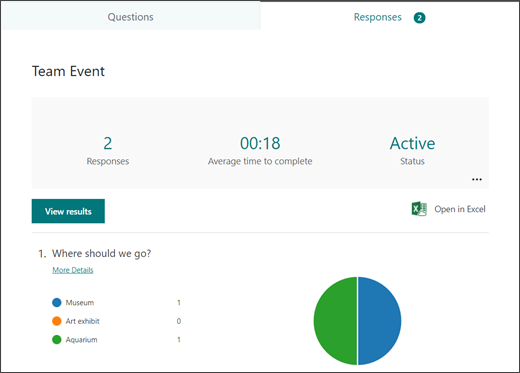
Microsoft Forms is an easy, drag-and-drop builder for surveys, quizzes, and simple forms. You send a link, and people can respond from any computer or phone. Answers feed in as they’re submitted, so you can review results right away, see charts inside Forms, and export everything to Excel if you want to analyze further.
Set Up Your First Form in Minutes
- Head to forms.office.com and sign in with your Microsoft account.
- From the top bar, start a blank Form or create a Quiz.
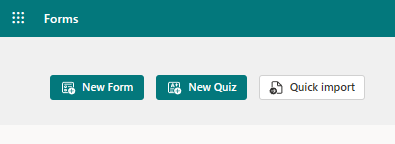
- Prefer a head start? Browse the built-in templates.


- Use Add new to insert another item. Available options include: Choice (multiple choice), Text, Rating, Date, Ranking, Likert scale, Net Promoter Score®, and Section breaks (you can add titles and images).
- Write your questions and any help text.
- When you’re ready, select Send to share a link, email it, turn it into a QR code, embed it on a web page, or post to Facebook or Twitter.
- Open the Responses tab to review answers as they arrive.
Why Teams Like Microsoft Forms
- Included with Microsoft 365. If your company already uses Microsoft 365, you likely have Forms. It could replace a separate survey tool you’re paying for, and it’s ready to use with your Microsoft sign-in.
- Saves time. No attachments, no downloads. People just click the link and respond. Forms gathers the replies for you automatically, so you’re not stuck tallying emails.
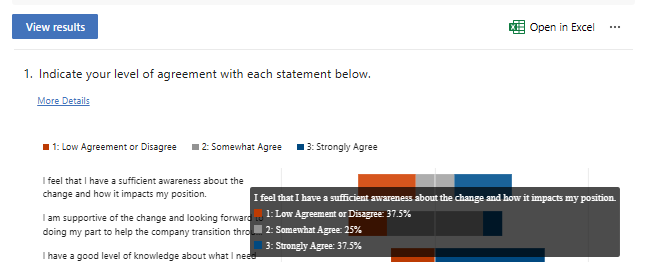
- Instant charts and easy export. See clear graphs inside Forms, then export to Excel when you want to dig deeper or load the data into another system.
- Simple to learn. The interface is clear and friendly, so most people can build a form without training.
Ideas To Use Forms In Your Business
Yearly Customer Feedback
Send an online satisfaction survey that customers can complete on any device. You’ll see responses in real time and spot trends—what’s working and what needs attention.
Staff Security Awareness Quiz
Fold a short quiz into your cybersecurity training. Forms will even show average completion time, so you can gauge how long it takes employees to finish.
Change Readiness Check
Planning a new system or workflow? Survey the impacted groups first to understand comfort levels and questions. It helps smooth adoption.
Event Sign-ups
Collect registrations for an open house or webinar. Share the link by QR code, social, text, or email—whatever fits your audience.
Volunteer Intake
Embed a volunteer sign-up form on your website. Forms can organize skills and availability so you can match people to roles faster.
More templates you can repurpose
- Competitor research questionnaire
- After-event feedback form
- Office maintenance or facility request
- Team morale and engagement survey
- Pricing input or product interest poll
- Catering or food service request
- “Hold the date” RSVP
- Course or training enrollment
Make the Most of Microsoft 365
Many organizations aren’t using everything they already have in Microsoft 365. If you’d like help rolling out Forms—or getting more value from the tools you pay for—we’re here for you.
Want practical help setting up Microsoft Forms for business across your team? Let’s talk. You can get in touch with Flux Labs anytime.