
Microsoft Viva Sales is a sales add-on that works with your CRM, Microsoft 365, and Teams to reduce manual data entry, surface insights where you work, and make collaboration and follow-up smoother—set to arrive in Q4 2022.
Sales people don’t win deals by filling out forms. Yet the notes, quotes, and order details they enter matter to the whole team. Managers depend on lead and pipeline reports. Operations rely on accurate customer info. Everyone benefits from analytics that help move deals to “closed won.”
Microsoft is tackling this with a new experience for sales teams: Microsoft Viva Sales. It’s part of the Viva family alongside Viva Insights (wellbeing) and Viva Learning (training). All Viva apps are built to work inside Microsoft 365 and Microsoft Teams and include automation to take the busywork off your plate.
What Microsoft Viva Sales Does
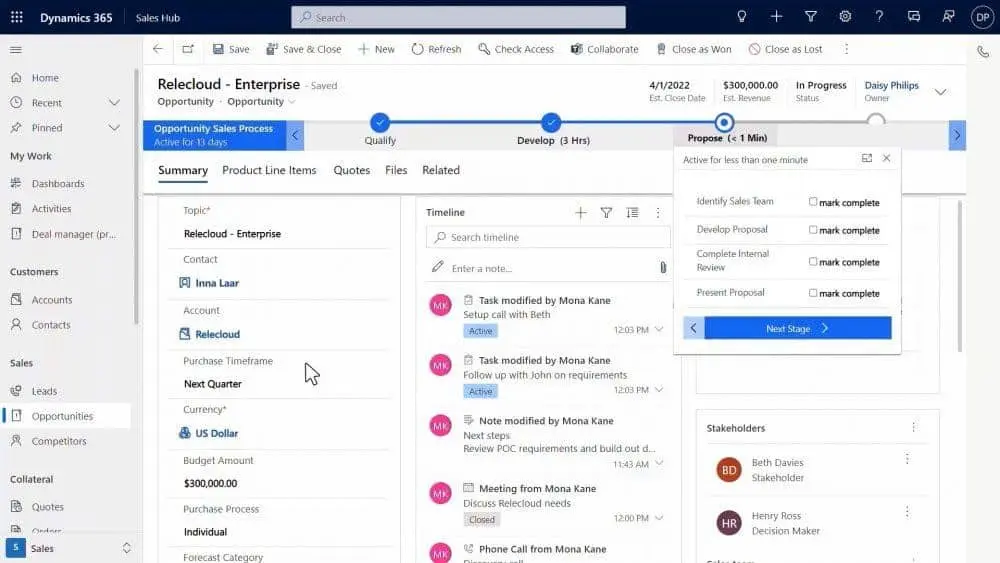
Think of Viva Sales as a helper for your CRM, not a replacement. It connects to your existing CRM and other sales tools, then pulls the right details into the places your team already spends time—Outlook, Teams, and your CRM screens. The goal is simple: cut the clicks so sellers can spend more time with customers.
On average, sellers spend about 34% of their day on administrative work. Trimming that time, even a little, can make a real difference for offices around Panama City.
- Less typing, more selling: Reduce duplicate entry by capturing info as you work.
- Use data you already have: Connects with Microsoft and non-Microsoft CRMs and tools to cross-reference details and reveal helpful insights.
- Helpful nudges: Get AI suggestions and reminders that support each step of your sales process.
Where You’ll See It Day to Day
Viva Sales brings customer context into the Microsoft 365 apps your team uses every day. Key details show up right in your Outlook calendar, email threads, Teams chats, and inside your CRM—Microsoft or otherwise—so you don’t have to hunt for them.
Key Features for Reps and Managers
Use Tags to Capture Sales Activity
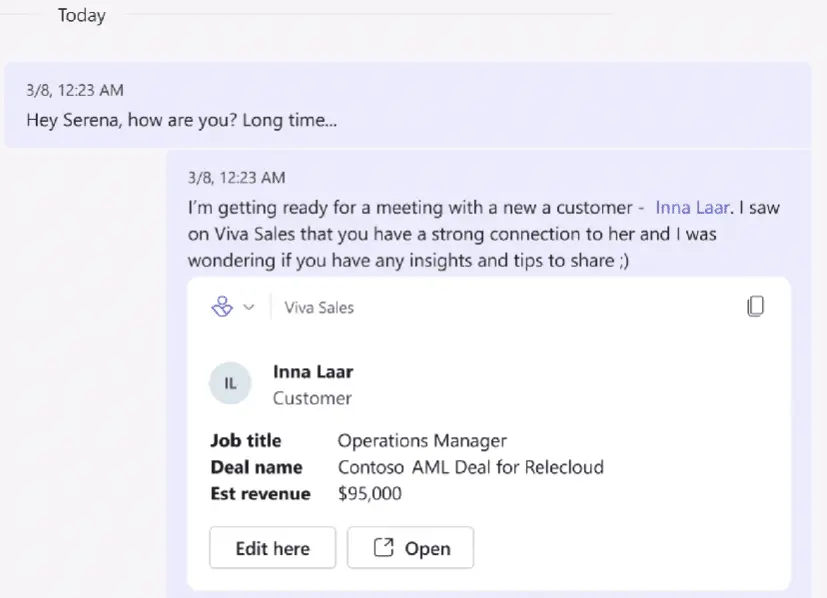
Tagging (using an @name) is already common in cloud apps, including Microsoft 365. With Viva Sales, that same action can save data to a customer or prospect. For example, you can add someone to a customer list by @mentioning their Viva Sales name, and the system records the related context automatically.
Faster Team Collaboration
No more copying and pasting account details into chats. Drop a tag and Viva Sales pulls in the lead or customer information for your team in seconds. You can also jump in to edit or open that record right away—fewer apps to open, fewer clicks to get the job done.
Call Summaries and Unified Engagement Data
Customer conversations often live in different places—voicemails here, website chat there. That makes it easy to miss something important. Viva Sales brings engagement data into one view so sellers can review call summaries and capture next steps without sifting through multiple systems.
Download Lists and Make It Your Own
If you like to work in Excel, you can download lead and customer lists from Viva Sales. Teams can also tailor parts of the experience to match the organization’s process.
Frequently asked questions
Is Microsoft Viva Sales a CRM?
No. It’s a CRM helper that connects to your current CRM and related sales apps to make everyday tasks easier, not a replacement for your core system.
Does it work with non-Microsoft CRMs?
Yes. Viva Sales is designed to connect with several platforms, including non-Microsoft programs and CRMs, so you can leverage data across your stack.
Where will insights appear?
Inside Microsoft 365 and Teams experiences you already use—such as Outlook and your calendar—as well as within your Microsoft or non-Microsoft CRM.
How do tags help capture information?
When you @mention someone’s Viva Sales name, the system links the message to the right lead or customer and saves the relevant context automatically.
Can I work with my data in Excel?
Yes. You can download contact, lead, and customer lists and work with them in Excel.
When You Can Start Using It
Microsoft says Viva Sales is “coming in Q4 2022.” There isn’t a firm date yet. You can watch an overview video and get updates on Microsoft’s site.
Get Ready with the Viva Suite
The Viva apps are built to boost productivity by connecting people to information, learning, and insights inside Microsoft 365. It’s a good time to explore the Viva tools already available and prepare for Viva Sales.
Want help planning how Microsoft Viva Sales could fit your sales process? Let’s talk. You can get in touch with Flux Labs anytime.