
Want faster answers? Use these Google search tips for business to zero in on the right results: search one site, filter by date, find specific file types, discover similar sites, exclude terms, and check flight status—right from Google.
Google handles over 2.4 million searches every minute. It’s often the first place we go, at home and at work. But digging through page after page can waste time.
Research tied to McKinsey found employees spend about 1.8 hours a day—9.3 hours a week—just searching and gathering information. That adds up fast, especially as the web keeps growing.
Here are some simple tricks to help your team find what they need quicker, whether you’re in Panama City or working on the road.
Google search tips for business you can use now
These shortcuts cut the noise so you get to the good stuff sooner.
Search One Site Only with site:
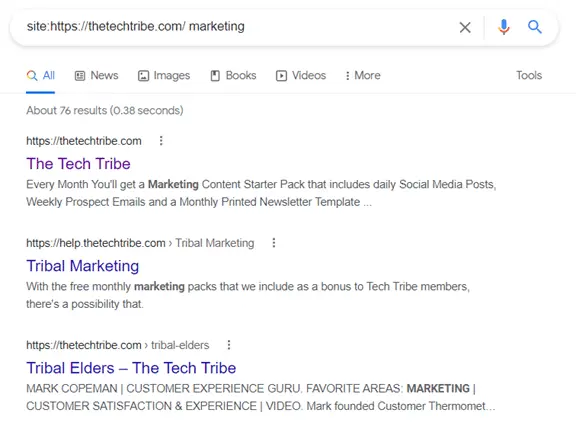
Know the website that likely has the answer? Tell Google to look there and nowhere else. Type this into the search bar: site:website.com your topic. Replace “website.com” with the address you want to search and add your keywords. Results will come only from that site.
Find Specific Files with filetype:
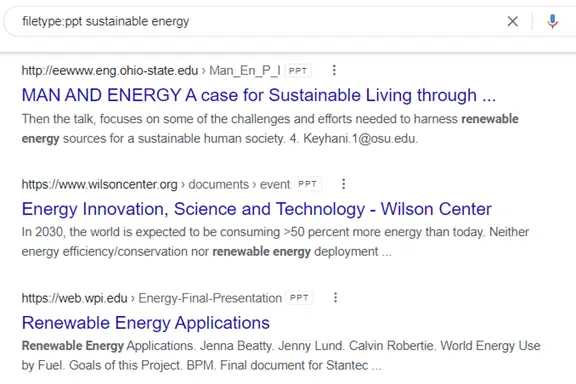
Looking for a presentation, PDF, or spreadsheet instead of a web page? Use: filetype:TYPE your topic. For example, to see example decks on sustainable energy, try: filetype:ppt sustainable energy. Your results will be PowerPoint files.
Other helpful file types include:
- DOC
- XLS or XLSX
- SVG
- and more
Show Only Recent Results with the Tools Menu
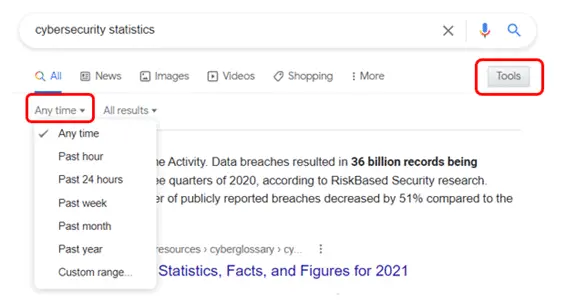
Old stats and out-of-date articles can lead you astray. Filter by time so you see fresher info:
- Search your keywords.
- Under the search bar, click Tools.
- Click Any time.
- Pick a range (like Past hour or Past year) or set custom dates.
Discover Similar Websites with related:
When you find a useful site, you can uncover others like it. In the search bar, enter: related:https://website.com. It’s a quick way to explore alternatives or even see who Google thinks are your competitors—just plug in your own domain.
Exclude Unwanted Results with a Minus Sign
Too many results about the wrong thing? Remove a word by adding a hyphen in front of it. For example: your topic -term. Google will leave out pages that include the term you’ve excluded, helping you focus on what matters.
Check Flight Status Right in Google
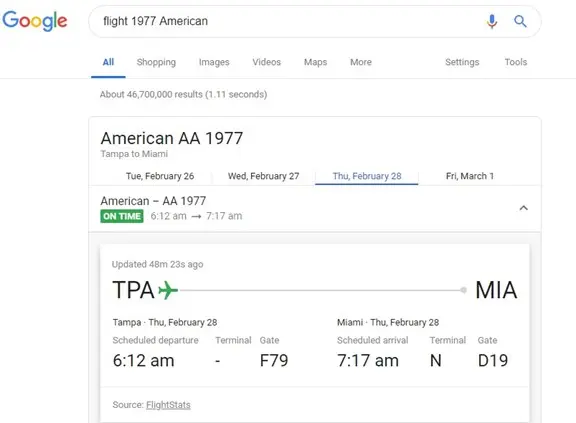
No need to open airline sites when you’re heading to ECP or tracking a pickup. Type the airline name and flight number into Google. You’ll see departure and arrival details instantly, and you can switch days for that same flight.
Sources and further reading
Need help rolling out time-saving tools across your computers and devices? We support offices around Bay County—get in touch with Flux Labs.